Made for production managers and coordinators
The production office runs on your follow-up. ArosTime does the chasing: reminders go out on their own, and the dashboard lists exactly what still needs you.

- to set a show up
- An afternoon
- crew lists and schedules it reads
- CSV, Excel, PDF
- reminder to anyone who has not submitted
- 9 PM
- to nudge the rest
- 1 tap
A shoot day, from the office
- Before day one
Upload what you already have
The crew list and shooting schedule are read in from CSV, Excel or PDF, and you check every row before it saves.
- The day before
Send the call sheet
Each person gets their own call and confirms with a tap. One button reminds whoever has not answered.
- At wrap
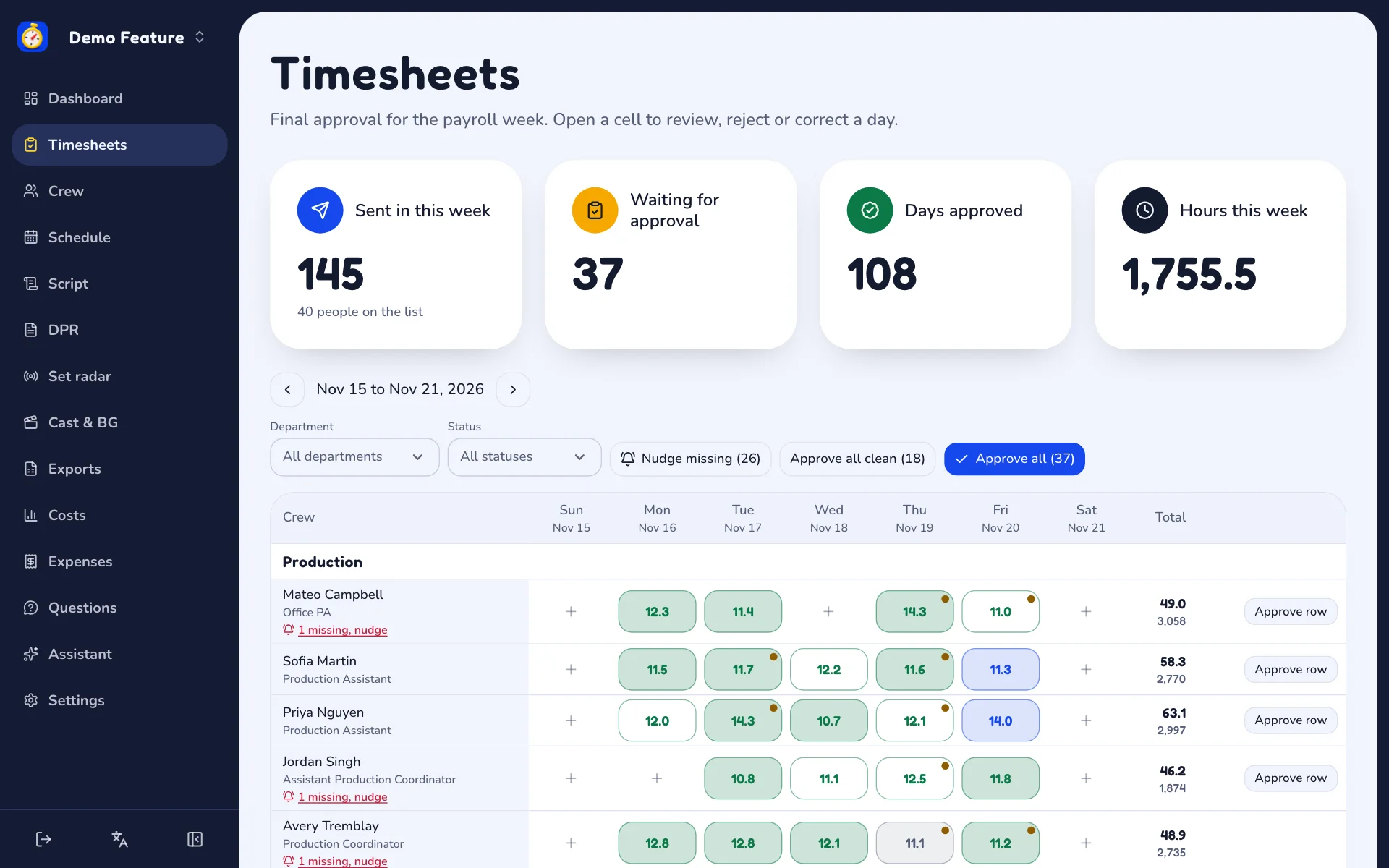
Timesheets come in by themselves
The dashboard shows how many are in and who is missing, by name and department.
- 9 PM
Reminders go out on their own
Anyone who worked and has not submitted is reminded. One tap nudges the rest.
- Next morning
The DPR is mostly written
Crew in and out times, call, wrap and the scenes scheduled are already on the page.
A real screen from arostime, on a demo production. The people and the figures are invented.
What you stop doing
Typing the crew list into one more system
Chasing timesheets by text every night
Assembling the DPR by hand at midnight
Wondering who actually read the call sheet
The tools the office uses




Before and after
| Paper and spreadsheets | With ArosTime | |
|---|---|---|
| The crew list | Retyped into every tool | Uploaded once, checked row by row |
| The call sheet | Sent and hoped for | Confirmed with one tap by each person |
| Missing timesheets | A nightly round of texts | A 9 PM reminder and a nudge button |
| The DPR | Built by hand after wrap | Opened with crew times already in it |
| Deal memos | Chased on wrap week | Sent from the crew list, with who has signed |
Set up in an afternoon
Create your company
Pick your company address and add the production. One show with up to 25 crew is free.
Upload the crew list and schedule
Or copy your last show, or pull returning crew from your rolodex.
Send the invites
Everyone on the list gets one email with a link. No passwords and nothing to install.
One list of what needs you
The dashboard shows the day as one bar and the week day by day, with a single list of everything waiting on the office: days to approve, timesheets missing and departments close to budget.
Roles for the whole office
- Admin, accountant, coordinator, department head and DPR editor
- An accountant can be given timesheets and exports without the rest of the production
- Authenticator-app two-step sign-in for office staff
- In English, French or Spanish
Questions people ask
What files can I upload?
Crew lists and shooting schedules as CSV, Excel or PDF. You match the columns and check every row before anything is saved. Reading a PDF is a paid extra.
Can I reuse the setup from our last show?
Yes. Copy a previous production, or pull returning crew from your company rolodex with their position, department and union local.
Is everything included in the free plan?
Timesheets, approvals, the daily production report and payroll files are. Call sheets, deal memos, petty cash and the assistant are extras you can request a quote for.
Does it replace our payroll company?
No. ArosTime collects and approves hours and exports a file for whichever payroll company you use.
How do day players get in?
By the same email link, or by scanning a QR code posted on set, with no password.